Want to monitor your sleep at home? The best sleep apps and wearable or non-wearable sleep technology can give you a clear picture of sleep quality and how it changes over time.
As an additional aid, white noise apps can help you fall asleep faster, sleep more deeply, and become less sensitive to sudden disturbances.
I’m a sleep medicine dentist. I’ve written about sleep quality and regularly help patients improve theirs, and I test the latest technology so you can see which apps and devices are worth trying.
Below are vetted recommendations for the best sleep trackers, apps, and white noise tools, along with their strengths, limitations, and when to speak with a doctor about sleep concerns.
Best Wearable Sleep Trackers + Tech
Wearable sleep trackers have become far more accessible over the past decade. While cheaper devices are attractive, keep in mind they often provide less reliable physiological data than higher-quality models.
Here are top wearable and near-bed options to consider.
#1: Oura Ring
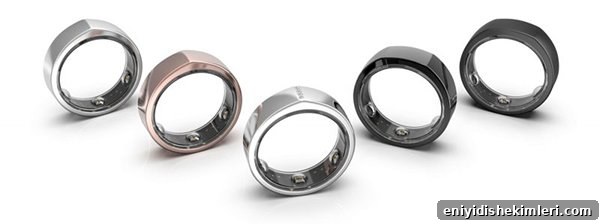
What it is: A discreet ring you can wear day and night.
Compatible with: Apple, Android
Cost: Starting at $299
Battery & charging: Induction charging; charges in 30–60 minutes and lasts about 2–3 days.
How it works: Oura uses temperature sensors, infrared LEDs, and motion sensors to estimate heart rate, heart rate variability (HRV), temperature shifts, and movement. These signals are combined to calculate a nightly sleep score.
Tracks: Sleep latency, total sleep time, awakenings, sleep timing, REM, light and deep sleep estimates, HRV trends, and body temperature changes useful for tracking menstrual and fertility patterns.
Pros:
- Validated against lab polysomnography in published studies
- Low-profile and comfortable to wear
- Elegant design and easy syncing with Apple Health
- Includes in-app notes and detailed analytics without required subscription
Cons:
- Doesn’t record snoring
- Android app lacks Google Fit sync
- Public user ratings aren’t centralized on the vendor site
#2: Apple Watch (Series 3 or 4)
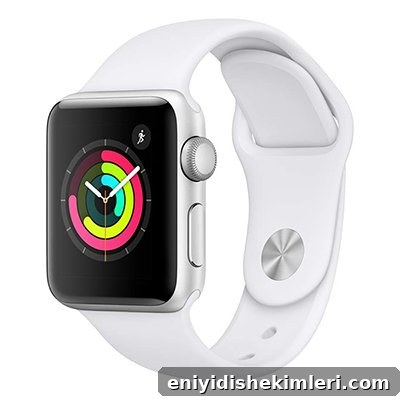
What it is: A smartwatch tightly integrated with iPhone.
Compatible with: Apple
Cost: Starts around $199 (Series 3) to $399 (Series 4), with used/older units available for less.
Battery & charging: Induction charging; charges in ~1.5–2 hours, typically lasts a day on a full charge.
How it works: Uses accelerometer, gyroscope, and heart rate sensors (including ECG on recent models) to estimate sleep-related physiology. Detailed tracking depends on the third-party sleep app you choose.
Tracks: Time in bed, movement, heart rate changes; some apps add snore tracking and haptic feedback to reduce snoring.
Pros:
- Syncs with Apple Health
- Internal microphone can support snore tracking with compatible apps
- ECG capability for cardiac monitoring features
- Works as an extension of the iPhone
Cons:
- For detailed analytics you often need a third-party sleep app
- Shorter battery life makes overnight charging trade-offs difficult
- Not compatible with Android
#3: Fitbit Charge (2 or 3)
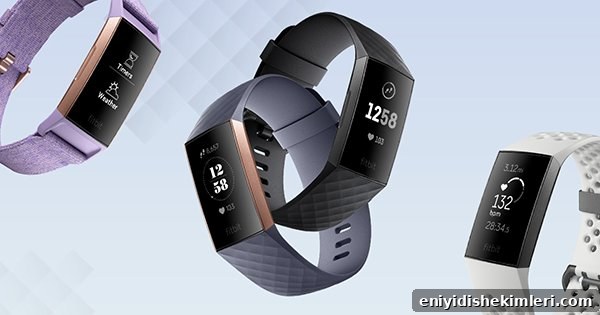
What it is: A slim fitness tracker with touchscreen.
Compatible with: Apple, Android, Windows Phone
Cost: Typically $100–150 depending on model and retailer.
Battery & charging: Wired charging; lasts roughly 5–7 days on a full charge.
How it works: Uses accelerometers and optical heart-rate sensors to log motion and heart-rate patterns and infer sleep stages.
Tracks: Sleep time, sleep stages inferred by motion and heart rate, automatic nap logging, sleep schedule reminders.
Pros:
- In-app guidance for improving sleep
- Bedtime reminders and schedule features
- “Sensitive” and “normal” modes for different sleepers
- Syncs with Apple Health and Google Fit
- Detailed analytics without required subscription
Cons:
- Doesn’t record snoring
- Uses wired charging rather than induction
- Older Charge 3 reported connectivity issues for some users
#4: Beddit Sleep Monitor
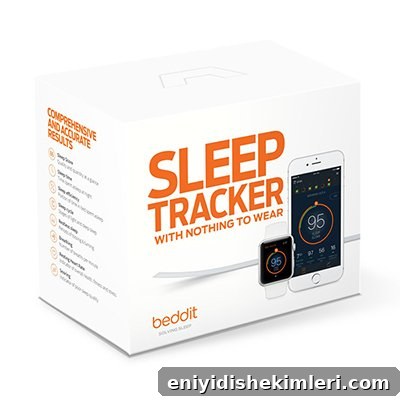
What it is: A non-wearable thin strip placed under your sheet or mattress that collects movement and environmental data.
Compatible with: Apple
Cost: Around $149.95
Power: Plugs into power; not battery powered.
How it works: The strip senses movement, heart rate estimates (when not overridden by other wearables), snoring via your connected iPhone, and room conditions like temperature and humidity.
Tracks: Movement, heart rate, snoring (via iPhone microphone), temperature, humidity, and sleep-score style summaries.
Pros:
- Automatic tracking once you lie down—no manual start required
- Records environmental conditions that many wearables do not
- Can connect with Apple Watch and Apple Health
- Offers suggestions to improve sleep and circadian rhythm
Cons:
- Recent versions have had connectivity and app issues
- Can interfere with other audio functions on some devices
- Newer firmware removed some detailed sleep phase distinctions and the strip’s smart alarm
- Not compatible with Android or Google Fit
Best Sleep Apps for Apple + Android
#1: SnoreLab
Available on: App Store, Play Store
Rating: High ratings on both stores (varies by platform)
Cost: Free with limited features; premium subscription available (monthly option).
Pros:
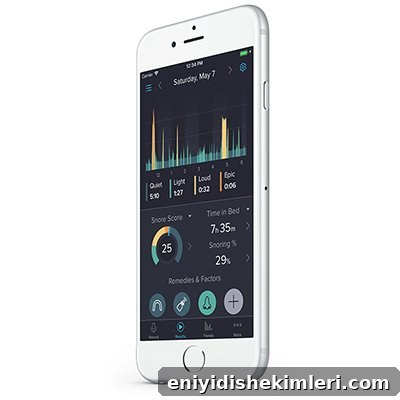
- Specializes in snoring measurement, which is a key indicator of disrupted sleep
- Records snoring events for playback and comparison
- Lets you log remedies and track their effectiveness
- Includes ambient noise and in-app sleep tips
Cons:
- Best used when you sleep alone, since it can’t always distinguish who is snoring
- Doesn’t integrate with wearable trackers to combine broader physiological data
- Requires manual start to protect privacy (automatic start is under development)
#2: SleepScore
Available on: App Store, Play Store
Cost: Free tier with limited features; subscription unlocks full analytics.
Pros:
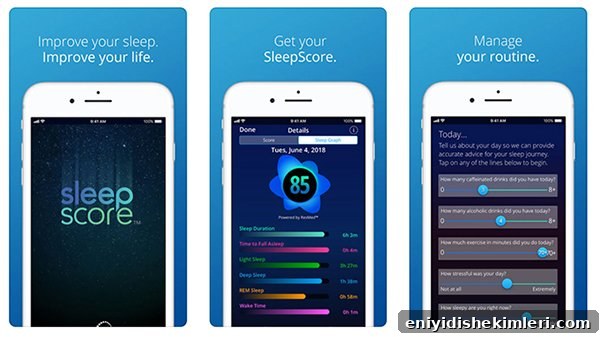
- Backed by scientific research and offers detailed sleep-phase analytics
- Includes a smart alarm and lifestyle logging to correlate habits with sleep
- Simple interface and companion tools for bedside environment tracking
Cons:
- Limited compatibility with some Android phones
- Some lifestyle habit tracking requires signing into the web dashboard rather than staying fully in-app
#3: SleepCycle
Available on: App Store, Play Store
Cost: Free tier; annual subscription for premium features.
Pros:
- Very popular, easy to use, with high user ratings
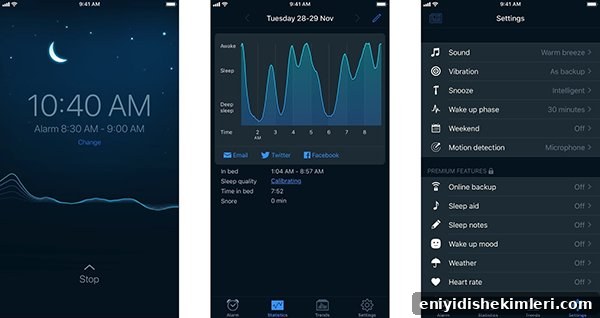
- Smart alarm wakes you in a lighter sleep phase
- Can work with Apple Watch and uses smartphone sensors when placed on the bed
- Includes snore detection and localized sleep insights
Cons:
- Doesn’t publish comprehensive scientific validation for all features
- Some limits exist in how precisely it identifies sleep stages
#4: Pillow
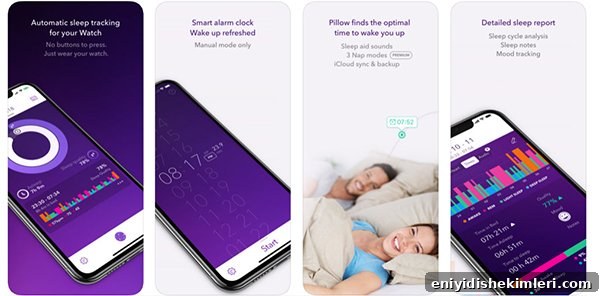
Available on: App Store (iOS only)
Cost: Free tier with optional subscription for full features.
Pros:
- Automatic mode so you don’t need to manually start tracking
- Apple Watch compatibility and detailed analytics
- Can record sounds for snoring and apneic events, plus in-app ambient noise
- Includes mood and notes logging to correlate lifestyle with sleep
Cons: Not available for Android devices.
Best White Noise Apps
If you use smart speakers like Alexa, Google Home, or HomePod, you can often ask them to play ambient noises such as ocean, rain, or fan sounds. If you prefer earbuds or phone speakers, white noise apps are convenient and effective.
White noise apps typically let you mix sounds, set fade timers, and unlock premium sound packs if desired. Here are some solid choices to try:
- Brain.fm (iOS, Android) — Uses scientifically designed ambient tracks tailored to focus or sleep.
- SnoreLab (iOS, Android) — Includes ambient noise and snore analysis tools.
- SleepScore (iOS, Android) — Offers bedside monitoring and soothing sounds in-app.
- Pillow (iOS) — Includes ambient sound options and sleep sound recording.
- Sleep Sounds by Sleep Pillow (iOS, Android) — Large library of relaxing sounds and timers.
Limitations of Sleep Tracking Apps
The biggest issues with consumer sleep tech are accuracy and convenience. Clinical sleep studies use polysomnography and multiple sensors to measure breathing, oxygen, brain waves, and muscle activity. Consumer devices estimate sleep using movement and optical heart-rate signals, so they can’t replace a diagnostic sleep test.
In my clinical experience, snoring detection is often the most practical signal to flag possible sleep-disordered breathing when using phone apps. Wearables like Apple Watch and Fitbit offer useful physiological trends but typically do not capture snoring directly.
Another common complaint is comfort—some people find it intrusive or uncomfortable to wear a device through the night, which affects adherence and data quality.
If you suspect a true sleep breathing disorder such as obstructive sleep apnea, only a physician-prescribed sleep study can confirm the diagnosis and guide treatment. Consumer apps are best used as screening and tracking tools to improve sleep hygiene and flag concerns.
Sleep App FAQs
Q: Should I track my sleep?
A: Yes. Sleep quality matters for overall and dental health. Tracking gives you actionable insights and helps you identify trends that may need professional attention.
Q: My sleep tracker says I’m not sleeping well. What should I do?
A: Start with basic, evidence-based improvements:
- Reduce blue light exposure from screens after early evening
- Create a calm, dark, cool bedroom (65–68°F is ideal for many people)
- Use white noise or ambient sound to mask sudden noises
- Practice a screen-free wind-down routine and calming activities like reading or gentle music
- Consider sleep-promoting habits: consistent sleep schedule, eye cover, and removing electronic lights
Q: When should I see a doctor about my sleep?
A: See your primary care provider or a sleep specialist if you experience persistent daytime sleepiness, frequent awakenings, loud or frequent snoring, signs of teeth grinding (bruxism), or if airway obstruction prevents behavioral strategies like mouth taping. Any device indicating repeated sleep disruption or lack of restorative sleep warrants medical evaluation.
Q: Do white noise generators actually help you sleep better?
A: Yes. Research shows that steady ambient noises—white, pink, or brown noise—can stabilize sleep, reduce awakenings, improve sleep quality, and help people fall asleep faster. White noise apps are a valuable addition to good sleep hygiene and circadian rhythm habits.
Key Takeaways: Best Sleep Apps + Wearable Sleep Tech
Tracking your sleep can highlight problems and guide improvements for better overall health. Consumer sleep apps and devices are useful for monitoring trends and encouraging healthy habits, but they are not a substitute for professional diagnostic testing when a sleep disorder is suspected.
Have a product or app you want reviewed? I welcome suggestions and feedback about what you’d like to see tested.